




Showing all 14 results




Filter by price
Filter by brands



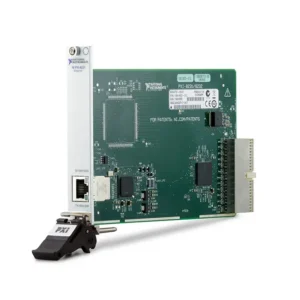


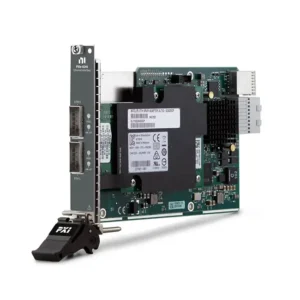

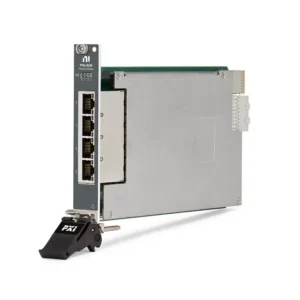


NI PXI GPIB, Ethernet and VXI Interfaces
NI PXI GPIB, Ethernet and VXI interfaces connect PXI automated test systems to external instruments, networked devices, servers, cameras, storage systems and legacy modular instrumentation. They allow the PXI controller and test software to communicate with equipment that operates outside the PXI backplane.
The category covers several different functions: IEEE 488 instrument control, standard Gigabit Ethernet, multiport test networks, GigE Vision image acquisition, high-speed Ethernet with RDMA, network-based synchronization and legacy VXI integration. Selection should begin with the required communication architecture rather than the highest available data rate.
What Are PXI GPIB, Ethernet and VXI Interfaces?
These modules normally provide communication rather than performing the primary electrical measurement. They connect the PXI controller to benchtop instruments, cameras, external computers, network storage, distributed test stations or legacy VXI systems.
A hybrid automated test system might combine PXI digitizers and switches with a GPIB power supply, an Ethernet-controlled oscilloscope, GigE Vision cameras and an existing VXI instrument rack. NI-VISA and interface-specific drivers allow these resources to operate within one LabVIEW, TestStand or custom application.
Main PXI Connectivity Types
Interface Type
Primary Function
Best Fit
Important Selection Factors
GPIB / IEEE 488
Controls programmable laboratory instruments
Legacy ATE, calibration and benchtop instrument automation
Controller capability, instrument count, cable length, NI-488.2 and VISA resources
Standard Ethernet
Provides TCP/IP, LXI or vendor-specific network communication
External instruments, distributed systems and dedicated test networks
Port count, link speed, RJ45 cabling, IP configuration and protocol support
GigE Vision
Transfers images and camera-control data over Gigabit Ethernet
Machine vision, scientific imaging and production inspection
Camera count, PoE, acquisition software, triggering and aggregate image rate
High-Speed Ethernet
Moves large measurement datasets between PXI and external systems
RF, digitizer, FPGA, server and storage applications
10/25/40/50 GbE, transceiver format, PXIe bandwidth and receiving endpoint
RDMA / RoCE
Supports low-overhead direct memory data movement
Continuous high-throughput measurement streaming
NI-RDMA, RoCE compatibility, switches, cables and complete data-path performance
VXI / MXI Integration
Connects legacy VXI instrumentation to newer controllers or PXI systems
Long-life aerospace, defense, calibration and production systems
PXI-side module, VXI-side interface, MXI generation, cable and NI-VXI support
PXI-6683, PXI-6683H, PXIe-6672 and PXIe-6674T are timing and synchronization modules rather than general-purpose Ethernet interfaces. Their network or front-panel connections distribute time, clocks or triggers and should not be selected as ordinary instrument-network adapters.
Current NI PXI GPIB, Ethernet and Timing Modules
Model
Unique Category
Key Differentiator
Best Fit
PXI-6683
External-Clock Network Timing Module
GPS, IEEE 1588, IRIG-B, clock routing and timestamping for PXI systems
Distributed acquisition requiring absolute time and external timing references
PXI-6683H
TCXO GPS/PTP Synchronization Module
GPS, IEEE 1588, IRIG-B, Gigabit Ethernet and a 10 MHz TCXO reference
Network-synchronized PXI systems and geographically distributed measurements
PXI-8231
Single-Port Classic PXI Gigabit Ethernet
One 10/100/1000BASE-T RJ45 interface for conventional PXI systems
Adding an independent network connection to a legacy PXI chassis
PXI-8232
Combined GPIB and Gigabit Ethernet
One IEEE 488 controller and one Gigabit Ethernet port in a single PXI module
Hybrid systems using both GPIB and Ethernet instruments
PXI-GPIB
Dedicated IEEE 488 Controller
HS488-compatible GPIB interface supporting as many as 14 external instruments
Calibration, laboratory automation and established GPIB test racks
PXIe-6672
PXIe Clock and Trigger Synchronization
TCXO-based clock generation, trigger routing and PXI Express timing distribution
Synchronizing multiple PXIe measurement and generation modules
PXIe-6674T
High-Stability OCXO Timing Module
High-accuracy 10 MHz OCXO with programmable clock generation and differential-star routing
Low-jitter RF, digitizer and multichassis synchronization
PXIe-8234
Dual-Port GigE Vision Interface
Two independent 1000BASE-T ports for Ethernet communication or two GigE Vision cameras
Legacy dual-camera vision and scientific imaging systems
PXIe-8238
Dual-Port PXIe Gigabit Ethernet
Two Gigabit Ethernet connections for network communication and instrument control
PXIe systems requiring two dedicated standard-speed network interfaces
PXIe-8240
Dual-Port 40 Gigabit Ethernet
Two QSFP+ ports supporting 10 or 40 Gbit/s with a PCIe Gen 3 x8 backplane interface
Large test-data transfers to servers, storage and other PXIe systems
PXIe-8245
Four-Port General-Purpose Gigabit Ethernet
Four independent 10/100/1000BASE-T RJ45 network interfaces
Multiple instruments, subnets or isolated test networks in one PXIe slot
PXIe-8246
Four-Port PoE GigE Vision Frame Grabber
Four GigE Vision camera ports with Power over Ethernet support
Multicamera machine vision and automated production inspection
PXIe-8280
Single-Port 50 Gigabit RoCE Interface
One QSFP28 50 GbE port with RoCE v2 and a PCIe Gen 3 x8 backplane link
High-throughput streaming to compatible servers and storage systems
PXIe-8285
Dual-Port 25 Gigabit RDMA Interface
Two SFP28 25 GbE ports with RoCE support and NI-RDMA software
Flexible high-bandwidth PXI-to-server and peer data movement
The category currently contains GPIB, Ethernet, vision, RDMA and timing modules. A VXI migration may require legacy PXI/VXI or MXI hardware that is not represented by the current product list. Confirm both ends of an existing VXI connection before ordering replacement hardware.
How to Select a PXI Communication Interface
1. Identify the External Equipment Interface
Begin with the connector, communication standard and programming interface used by the external equipment. Determine whether it uses GPIB, TCP/IP, LXI, GigE Vision, conventional Ethernet, RoCE/RDMA or a legacy VXI/MXI connection.
An RJ45 connector does not identify the complete protocol. Equipment may use VISA TCP/IP, raw sockets, EtherCAT, proprietary Ethernet messages or an industrial protocol requiring a different interface family.
2. Separate Instrument Control From Data Streaming
Instrument control usually consists of short commands and measurement responses. GPIB or standard Gigabit Ethernet is normally adequate for configuring a DMM, power supply, signal generator or environmental chamber.
Continuous RF, digitizer, image or FPGA data can require tens of gigabits per second. These applications should be designed around sustained throughput, PXIe bandwidth, memory handling and the performance of the receiving server or storage system.
3. Determine the Required Port Count
A single Ethernet port may be sufficient for one instrument network. Multiple ports allow individual instruments or cameras to use separate subnets and prevent high-rate device traffic from competing with the facility network.
For machine vision, also determine the number of cameras and whether each camera requires PoE. PXIe-8234 supports two GigE Vision connections without camera power, while PXIe-8246 provides four GigE Vision ports with PoE support.
4. Choose the Required Ethernet Speed
Nominal Link Speed
Typical Use
Common Connector
1 GbE
Instrument control, standard networking, GigE Vision and moderate file transfer
RJ45
10 GbE
Higher-rate data transfer and compatibility with supported 10 GbE infrastructure
SFP+ or QSFP+ breakout architecture
25 GbE
High-rate measurement streaming and RDMA
SFP28
40 GbE
Large data transfers between PXIe systems, servers and storage
QSFP+
50 GbE
Very-high-throughput RoCE v2 measurement data movement
QSFP28
Nominal link speed is not guaranteed application throughput. Ethernet framing, protocol overhead, PXIe backplane limitations, memory transfers, software and the receiving endpoint reduce the sustainable payload rate.
5. Verify PXI or PXI Express Slot Compatibility
PXI-8231, PXI-8232 and PXI-GPIB use conventional PXI architecture and require a compatible PXI or hybrid peripheral slot. PXIe network interfaces require PXI Express-compatible slots.
High-speed interfaces also require sufficient PCIe generation, lane width and chassis segment bandwidth. A physical PXIe slot may accept a module while providing less data bandwidth than the application requires.
6. Select the Correct Cable and Transceiver
Standard Gigabit Ethernet normally uses correctly terminated Category 5e or better RJ45 cabling. High-speed interfaces can require SFP28, QSFP+ or QSFP28 optical transceivers, active optical cables or direct-attach copper cables.
The module, cable, transceiver, switch and receiving network adapter must support a compatible speed and physical-layer standard. Transceivers and cables should not be assumed to be included with the interface module.
7. Confirm Driver and Operating-System Support
GPIB interfaces normally require NI-488.2 and may be accessed through NI-VISA. Standard Ethernet interfaces use supported operating-system network drivers, while vision products can require NI Vision Acquisition Software. RDMA modules require the applicable NI-RDMA and network software environment.
Legacy hardware should be checked against the existing operating system, LabVIEW or TestStand version, application architecture and saved VISA resource configuration before purchase.
GPIB Instrument Control
GPIB—also called IEEE 488 or HP-IB—is widely used with programmable oscilloscopes, DMMs, signal generators, power supplies, electronic loads, analyzers and calibration instruments.
A GPIB system contains a controller and one or more addressed instruments. PXI-GPIB provides a dedicated controller, while PXI-8232 combines GPIB and Gigabit Ethernet in one module. Each instrument on the bus must use a unique address.
GPIB performance depends on the controller, connected instruments, cable topology and data-transfer size. HS488 operation requires compatible instruments and cabling; the interface’s maximum rate should not be treated as guaranteed application throughput.
Standard Ethernet and LXI Instrument Control
Ethernet-connected instruments may communicate through VISA TCP/IP resources, LXI services, raw sockets or manufacturer-specific APIs. Standard Gigabit Ethernet is generally sufficient for sending SCPI commands and retrieving scalar measurements or moderate waveform records.
Network configuration may include static IP addresses, subnet masks, gateways, VLANs and firewall rules. A successful network ping proves basic IP connectivity but does not confirm that the instrument driver, VISA resource or required control protocol is working.
GigE Vision and Machine Vision Interfaces
GigE Vision transports camera data and control messages over Gigabit Ethernet. A vision application also requires compatible cameras, lenses, lighting, cabling, image-acquisition software and adequate controller and storage performance.
Important selection criteria include:
Number of simultaneous cameras
Image resolution, frame rate and pixel format
Aggregate camera data rate
PoE power requirements
External trigger and synchronization requirements
NI Vision Acquisition Software compatibility
Image-processing and storage workload
Camera interfaces in this category should also be reviewed against the dedicated PXI Vision category when the primary application is image acquisition.
High-Speed Ethernet and RDMA
High-speed digitizers, RF instruments and FPGA modules can generate more data than a conventional Gigabit Ethernet connection can transfer continuously. PXIe high-speed Ethernet modules provide faster links to compatible servers, storage or processing systems.
RDMA over Converged Ethernet allows supported systems to move data with reduced processor involvement and fewer memory-copy operations. This capability requires a compatible module, network adapter, cable or transceiver, operating system, driver and network configuration.
Calculate the complete path:
Measurement module → PXIe slot → chassis segment → controller memory → Ethernet interface → network → server memory → storage or processing.
The lowest sustainable rate in this path determines whether continuous streaming can be maintained.
VXI Integration and Legacy Migration
VXI systems remain in service in aerospace, defense, semiconductor, calibration and long-life production applications. A VXI connection may use a matched PXI-side interface, VXI Slot 0 controller, MXI cable and generation-specific software.
Before replacing a VXI interface, document:
PXI-side interface model and part number
VXI-side interface or Slot 0 controller
VXI chassis and installed instruments
MXI generation and cable type
NI-VXI and NI-VISA versions
Operating system and controller model
VISA resource names and instrument drivers
Existing LabVIEW, TestStand or custom application
Do not order one side of a legacy VXI/MXI link without confirming the corresponding interface and cable. Similar-looking connectors can belong to incompatible MXI generations.
Ethernet Interface Versus PXI Remote Control
Requirement
PXI Ethernet Interface
PXI MXI Remote Control
TCP/IP Networking
Primary function
Not the primary function
LXI Instrument Control
Supported with compatible protocols and software
Not its intended purpose
Network Storage or Servers
Suitable
Different architecture
External PC Enumerates PXI Modules
No
Yes
Extends the PCIe Bus
No
Yes
If an external computer must directly enumerate and control the modules installed in a PXI chassis, select a product from the PXI MXI Interfaces category rather than a standard Ethernet network module.
Software and System Configuration
Common software components include:
NI-488.2: Driver and API support for compatible NI GPIB controllers.
NI-VISA: Common instrument communication architecture for GPIB, Ethernet, USB, serial, PXI and VXI resources.
NI-Sync: Configuration and programming support for compatible timing and synchronization modules.
NI-RDMA: Software support for compatible high-speed RDMA data-transfer hardware.
NI Vision Acquisition Software: Camera discovery, configuration and image acquisition for supported GigE Vision interfaces.
NI MAX: Hardware discovery, interface configuration and communication testing.
LabVIEW and TestStand: Application development and automated test sequencing.
The required software depends on the module and application. Confirm operating-system, driver and development-environment compatibility before changing an interface in a validated system.
Typical Applications
Automated control of GPIB laboratory instruments
Hybrid PXI, LXI, USB and benchtop test systems
Calibration and metrology automation
Production functional testing
GigE Vision machine inspection
Scientific and multicamera imaging
RF and digitizer data offload
PXI-to-server measurement streaming
Distributed data acquisition
Dedicated laboratory and production networks
Aerospace and defense VXI modernization
Legacy test-station maintenance
Legacy Interface Replacement
Replacing a communication interface requires more than matching its connector. The replacement can change the operating-system driver, VISA resource name, controller index, supported protocol, data rate and application behavior.
Compare the following before approving a replacement:
Exact model and complete part number
PXI or PXI Express form factor
Number, speed and type of ports
Connector and cable or transceiver requirements
NI-488.2, NI-VISA, NI-Sync, NI-RDMA or vision-software support
Operating-system and controller compatibility
Existing IP addresses and VISA resource names
Connected instrument or camera models
PXIe slot bandwidth and cooling
Application-code and system-requalification requirements
PXI GPIB, Ethernet and VXI RFQ Guide
Provide the following information for interface selection and quotation:
Required interface model and complete part number
GPIB, Ethernet, GigE Vision, RDMA, VXI or timing requirement
Models of connected instruments, cameras or servers
Required number of ports and Ethernet speed
Expected sustained data-transfer rate
GPIB instrument quantity and cable lengths
RJ45, SFP28, QSFP+ or QSFP28 connection requirement
Required optical transceivers or direct-attach cables
PoE requirement for connected cameras
PXI/PXIe chassis and controller models
VXI chassis and VXI-side interface model
Operating system and NI software versions
Required quantity and preferred product condition
Delivery destination and required delivery date
For pre-owned communication hardware, request module-recognition and port-function test results. High-speed interfaces should be tested with compatible cables, transceivers and endpoints rather than evaluated only by chassis detection.
FAQ
What is the difference between PXI-GPIB and PXI-8232?
PXI-GPIB is a dedicated IEEE 488 instrument controller. PXI-8232 combines a GPIB controller with a Gigabit Ethernet port, making it suitable when both legacy GPIB and network connectivity are required.
Can a PXI GPIB interface control third-party instruments?
Yes. It can control compatible IEEE 488 instruments from different manufacturers. The application must use the correct instrument commands, GPIB address, driver and timeout settings.
Is Ethernet faster than GPIB?
Ethernet usually provides a higher nominal data rate, but total test time can be limited by instrument processing and command latency. GPIB remains suitable for many automated instrument-control applications.
When is an RDMA interface required?
RDMA is useful when large measurement streams must move continuously between PXI and compatible servers, storage or processing nodes. It is normally unnecessary for occasional SCPI commands or small measurement results.
What is the difference between PXIe-8280 and PXIe-8285?
PXIe-8280 provides one 50 GbE QSFP28 connection with RoCE v2. PXIe-8285 provides two 25 GbE SFP28 connections with RDMA support. Selection depends on the required port topology and compatible external infrastructure.
Can PXIe-8245 be used for GigE Vision?
It provides four general-purpose Gigabit Ethernet ports, but a complete vision application also depends on camera, PoE and NI Vision Acquisition Software requirements. PXIe-8246 is specifically positioned as a four-port PoE GigE Vision frame grabber.
Is an Ethernet module the same as an MXI controller?
No. Ethernet provides network communication between independent systems. MXI extends PCI or PCI Express so an external computer can enumerate and control the modules installed in the PXI chassis.
Can an older VXI system be connected to PXI?
Yes, when compatible VXI/PXI or MXI interface hardware exists on both sides. The exact VXI controller, PXI interface, cable generation, software and operating system must be identified before selecting replacement hardware.
Recommended PXI Connectivity Products
Consider the PXI-GPIB for dedicated IEEE 488 instrument control, the PXI-8232 for combined GPIB and Gigabit Ethernet, the PXIe-8246 for four-camera PoE GigE Vision acquisition, or the PXIe-8285 for dual-port 25 GbE RDMA data transfer.
Related NI PXI Solutions
Install the selected interface in a compatible PXI or PXIe chassis and confirm processing and operating-system support with the selected PXI controller. Review PXI Data Streaming for continuous recording requirements and PXI Industrial Communication for CAN, LIN, automotive Ethernet and other application-specific networks.
NI PXI GPIB, Ethernet and VXI Interfaces from PXISOURCE
PXISOURCE supports engineers, calibration laboratories, production facilities, system integrators and procurement teams with GPIB interface selection, Ethernet port and bandwidth planning, GigE Vision connectivity, RDMA hardware sourcing, PXI slot compatibility and legacy VXI migration. Send the external equipment models, PXI configuration, software environment and required cables for a technically matched quotation.
Need help selecting an NI PXI GPIB, Ethernet or VXI interface? Email [email protected] or contact PXISOURCE through WhatsApp.